Best TPM-Enabled Business Desktops in the USA — Top 5 for 2026
Published on Tuesday, January 27, 2026
TPM-enabled business desktops provide a hardware-based root of trust that protects sensitive information at the chip level. These systems support TPM 2.0 for secure boot, measured boot, and strong cryptographic key storage, helping IT teams deploy full-disk encryption, hardware-backed credentials, and safer firmware updates. In the USA market, buyers prioritize devices that combine robust security with manageability, performance, and cost efficiency; that is why organizations choose TPM-enabled desktops for compliance with standards, protection against credential theft, and simplified endpoint management. Whether you need a tower for expandability, a small form factor for space-constrained offices, or a compact desktop mini for dense deployments, TPM-enabled business desktops deliver practical security benefits without sacrificing day-to-day usability.
Top Picks Summary
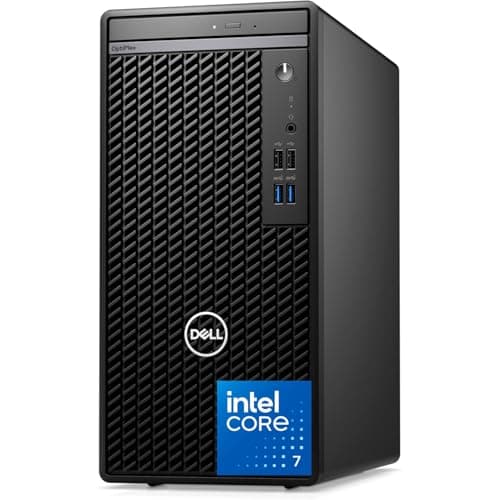
Dell OptiPlex 7010 Tower
The OptiPlex 7010 Tower is positioned as a cost-effective, TPM-enabled business desktop that emphasizes expandability and easy on-site servicing, making it a strong choice for IT teams that need to standardize and extend hardware lifecycles. Compared with the smaller form-factor systems on this list, it offers superior internal upgrade flexibility and a better price-per-upgrade-dollar, while trading off some space and energy efficiency versus mini and SFF models.
Why TPM Matters: Research and Evidence
Independent guidance and vendor research support using hardware roots of trust to reduce security risk across enterprise endpoints. Standards bodies and major platform vendors recommend TPM and secure boot as part of a layered defense strategy because hardware-backed keys and measured boot reduce the attack surface for credential theft and persistent firmware attacks. For organizations in the USA, adopting TPM-enabled desktops is a practical step toward meeting regulatory expectations and improving resilience against common enterprise threats.
NIST and industry guidance recommend hardware roots of trust and secure boot mechanisms to strengthen endpoint security and integrity.
TPM stores cryptographic keys in isolated hardware, making it considerably more difficult for attackers to extract credentials compared with software-only storage.
Integration with full-disk encryption solutions such as BitLocker provides seamless protection for data at rest and helps meet compliance requirements.
Measured and secure boot reduce the risk of persistent malware by ensuring only trusted firmware and OS components load during startup.
Vendor whitepapers and enterprise case studies show TPM adds strong security with minimal performance impact for typical office workloads.
Frequently Asked Questions
What is the best tpm-enabled business desktops — top 5 for 2026?
As of April 2026, Dell OptiPlex 7010 Tower is the top choice for tpm-enabled business desktops — top 5 for 2026 in USA. The OptiPlex 7010 Tower is positioned as a cost-effective, TPM-enabled business desktop that emphasizes expandability and easy on-site servicing, making it a strong choice for IT teams that need to standardize and extend hardware lifecycles. Compared with the smaller form-factor systems on this list, it offers superior internal upgrade flexibility and a better price-per-upgrade-dollar, while trading off some space and energy efficiency versus mini and SFF models.
What are the key features of Dell OptiPlex 7010 Tower?
Dell OptiPlex 7010 Tower features: Older OptiPlex tower with optional TPM module; many refurbished units include TPM 1.2., Tower layout offers easy access and upgradeability for drives and PCIe cards., Reliable business-grade chassis with basic remote management support on compatible configurations..
How much does Dell OptiPlex 7010 Tower cost?
Currently in 2026, Dell OptiPlex 7010 Tower is priced at $789.99.
What are the benefits of Dell OptiPlex 7010 Tower?
The main benefits include: TPM-secured boot, Easily serviceable, Classic workhorse (refuses retirement).
How does Dell OptiPlex 7010 Tower compare to HP EliteDesk 800 G9 Desktop Mini?
Based on April 2026 data, HP EliteDesk 800 G9 Desktop Mini has a higher rating (4.65/5 vs 4.4/5). However, Dell OptiPlex 7010 Tower offers competitive value with Older OptiPlex tower with optional TPM module; many refurbished units include TPM 1.2., making it a better choice for those who prioritize these features.
Conclusion
In the USA market for 2026, TPM-enabled business desktops are a practical foundation for modern endpoint security. The five recommended systems on this page offer a range of form factors and capabilities: Dell OptiPlex 7010 Tower, HP EliteDesk 800 G9 Desktop Mini, Lenovo ThinkCentre M70q Gen 4, Dell Precision 3660 Tower, and HP ProDesk 400 G9 Small Form Factor. For most organizations seeking the best balance of security, manageability, and compact design, the Lenovo ThinkCentre M70q Gen 4 stands out as the best overall choice. If you did not find exactly what you needed here, you can refine or expand your search using the search tool to filter by form factor, CPU, or manageability features. We hope you found what you were looking for and that this guide helps you select the right TPM-enabled desktop for your business.