Best Desktop External Hard Drives in the USA — Top 7 Picks for 2026
Published on Thursday, February 26, 2026
Desktop external hard drives are a crucial tool for anyone who requires significant data storage. Offering large capacities, desktop drives are designed for stationary use, with robust enclosures and active cooling that make them reliable for extended backups, media libraries, and local archive tasks. In the USA, consumers favor these drives for cost-effective cost-per-terabyte, simple plug-and-play backup, and the ability to keep large volumes of data on-premises rather than relying solely on cloud services. Typical buyers include digital creatives, video editors, photographers, home office users, and small businesses in metropolitan areas such as New York, Los Angeles, and Chicago who need dependable, high-capacity storage. Desktop external drives appeal because they pair high storage volumes with familiar USB connectivity (USB 3.x and USB-C), predictable performance, and longer service life compared with many portable options.
Top Picks Summary
WD Elements Desktop 12TB
The WD Elements Desktop 12TB is a powerhouse storage solution that offers enormous capacity for data-heavy users, whether for personal or professional use. Standing out for its simplicity and reliability, this external hard drive requires no additional software and is ready to use right out of the box. Great performance coupled with a compact design makes it a practical choice for anyone needing easy expansion of their storage. Its affordability compared to other high-capacity drives makes it an appealing option in the market.

Seagate Expansion Desktop 16TB
The Seagate Expansion Desktop 16TB is a high-capacity, cost-efficient desktop external hard drive that wins on raw storage density and price-per-terabyte for Desktop External Hard Drives. Compared with the LaCie d2 Professional and Buffalo/Toshiba offerings it trades advanced interfaces and ruggedized design for straightforward plug-and-play value, and it undercuts the Seagate One Touch Desktop Hub on cost while offering nearly the same bulk storage.
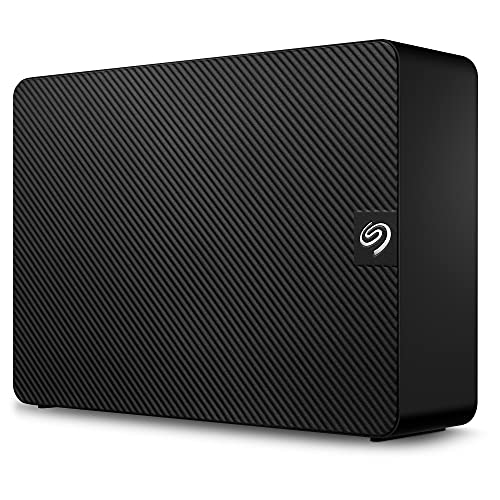
WD_Black D10 Game Drive 12TB
The WD_Black D10 Game Drive 12TB is designed specifically for gamers, offering a massive storage capacity to accommodate a vast library of games. Its high-speed performance ensures that games load quickly and run smoothly, enhancing the overall gaming experience. With a sleek design and customizable RGB lighting, it adds a stylish touch to your gaming setup. Additionally, the drive features durable construction, providing reliability for gamers on the go.

LaCie d2 Professional 10TB
LaCie d2 Professional 10TB positions itself as the premium, performance-oriented option among Desktop External Hard Drives thanks to a reinforced aluminum chassis and Thunderbolt/USB-C throughput aimed at creative professionals. It costs more per TB than Seagate and Toshiba models but delivers lower latency and sustained transfer consistency for video and photo workflows, making it preferable when speed, build quality, and pro features matter.

Seagate One Touch Desktop Hub 18TB
The Seagate One Touch Desktop Hub 18TB leads the list on maximum consumer capacity and convenience, combining very large storage with integrated hub and backup features tailored to home office users. Although it may carry a price premium versus the Expansion and Toshiba units, its higher total capacity and added connectivity can replace multiple smaller drives and reduce peripheral clutter for users who want an all-in-one desktop storage hub.

Buffalo DriveStation Axis Velocity 4TB
Buffalo DriveStation Axis Velocity 4TB is the compact, performance-oriented choice in this Desktop External Hard Drives lineup, designed for users who prioritize fast local backups and a small footprint over raw capacity. Its lower purchase price and smaller chassis make it an attractive option for single-user setups or point-of-sale systems, but it cannot match the cost-per-terabyte or large-media archive capability of the larger Seagate and Toshiba desktop drives.
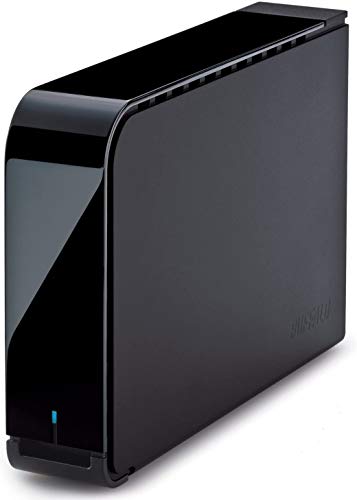
Toshiba Canvio Desktop 10TB
Toshiba Canvio Desktop 10TB offers a balanced, reliability-focused midrange option among Desktop External Hard Drives, combining a competitive price-per-terabyte with solid warranty support and conservative engineering. It sits between Seagate’s budget Expansion and LaCie’s pro tier—cheaper than LaCie yet more robust than the smallest Buffalo unit—making it a good choice for buyers who want dependable desktop storage without paying for pro-level interfaces.

What research and industry guidance say about desktop external drives
Industry reporting and technical guidance underline the practical benefits of using desktop external hard drives for large-scale local storage and backup. Market analysis shows that traditional hard disk drives remain the most affordable solution for multi-terabyte local storage, while long-term reliability assessments and best-practice recommendations stress the importance of backup strategies, temperature control, and selecting established drive models. Organizations and independent reporters regularly evaluate drive failure trends and provide actionable advice for consumers choosing a desktop external drive.
Backup best practice: Follow the 3-2-1 rule (three copies of data, on two different media, with one copy offsite) to protect against drive failure and data loss.
Reliability oversight: Regular reports from industry observers track drive failure patterns and help consumers choose models with consistent reliability histories.
Thermal management: Research and vendor guidance show that desktop enclosures with better cooling tend to prolong drive life versus poorly ventilated units.
Cost per terabyte: Market data confirms that desktop HDDs still offer the lowest cost per TB for high-capacity local storage compared with SSDs.
Use-case matching: Choose 7200 RPM or drives marketed for performance tasks for editing and gaming; choose lower-speed, higher-capacity models for long-term archival storage.
Frequently Asked Questions
Which desktop external hard drive should gamers buy?
WD_Black D10 Game Drive 12TB is built for gamers, with 12TB storage and a design optimized for game libraries, and it has a 4.7 rating.
Does Seagate Expansion Desktop 16TB support USB plug-and-play?
Yes—Seagate Expansion Desktop 16TB is USB 3.x plug-and-play, using a 16TB single-drive desktop enclosure.
How does WD Elements Desktop 12TB price compare?
WD Elements Desktop 12TB costs $499.90 USDand provides 12TB capacity with simple plug-and-play setup and quiet, energy-efficient operation.
Is Seagate Expansion Desktop 16TB for Windows and Mac?
Seagate Expansion Desktop 16TB is listed as USB 3.x plug-and-play compatible with Windows and Mac, but it may require reformatting.
Conclusion
This roundup compares seven trusted desktop external hard drives available in the USA for 2026: WD Elements Desktop 12TB, Seagate Expansion Desktop 16TB, WD_Black D10 Game Drive 12TB, LaCie d2 Professional 10TB, Seagate One Touch Desktop Hub 18TB, Buffalo DriveStation Axis Velocity 4TB, and Toshiba Canvio Desktop 10TB. For most users who want the best balance of high capacity and everyday convenience, the Seagate One Touch Desktop Hub 18TB stands out as the top choice thanks to its large storage and hub-style connectivity. If you need gaming-focused performance, consider the WD_Black D10 Game Drive 12TB; professionals who prioritize durability and pro-grade components may prefer the LaCie d2 Professional 10TB. We hope you found what you were looking for. You can refine or expand your search using the site search to compare capacities, speeds, warranties, or connectivity options.