Top 5 USB-Powered Cooling Pads in the USA for 2026
Published on Monday, January 26, 2026
USB-powered cooling pads provide a convenient solution for users looking to enhance their laptop's cooling without needing an external power source. They connect easily to a laptop's USB port, making them portable, plug-and-play, and ideal for remote work, travel, or desk setups where a wall outlet may not be immediately available. In the USA market, buyers prioritize a mix of cooling performance, quiet operation, build quality, and compatibility with a wide range of laptop sizes. Recent consumer preferences also emphasize low power draw, USB-C readiness or passthrough, ergonomic tilt options to improve typing comfort, and affordable price points that deliver measurable thermal benefits without bulky, heavy designs. Whether you use your laptop for creative work, office tasks, or gaming, a well-chosen USB-powered cooling pad can reduce surface and internal temperatures, reduce thermal throttling, and help extend component life while remaining easy to carry and use.
Top Picks Summary
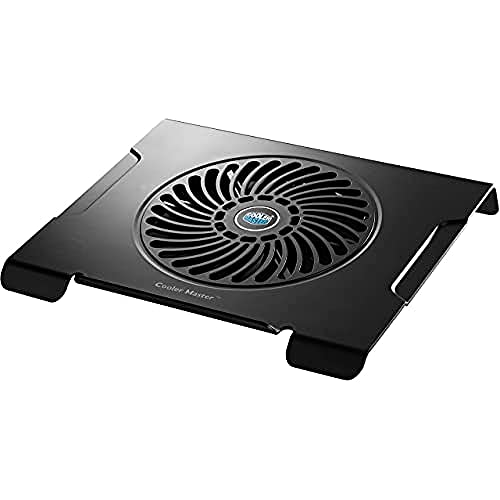
Cooler Master NotePal X3
The NotePal X3 is positioned as the best-in-class USB-powered cooling pad thanks to its single large high-airflow 200mm fan, solid metal mesh platform and an integrated fan speed controller that delivers superior cooling for gaming and workstation laptops. It trades a higher upfront price for noticeably better sustained thermal performance, quieter operation and build quality compared with the lighter, budget-oriented pads in this list, making it the top choice when peak cooling and durability are priorities.
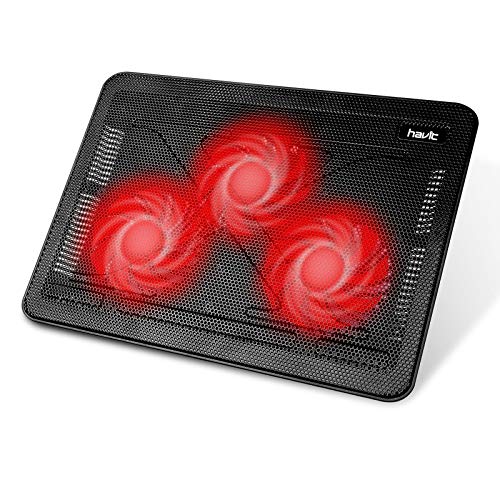
Havit HV-F2056
The Havit HV-F2056 is a market-leading budget option that combines a thin, portable aluminum-mesh platform with three 110mm fans to provide reliable USB-powered cooling at a very low price point. It offers strong portability and value for casual users and students, though it sacrifices the raw fan power and advanced controls of premium models like the NotePal X3 — a worthwhile tradeoff if upfront cost and light weight matter most.
TopMate C5
The TopMate C5 stands out for balancing midrange performance and features: a multi-fan layout, adjustable height settings, an LCD display and multiple fan speed modes that give users more control than most budget pads. It delivers better ergonomics and configurable cooling compared to simple plug-and-play models (Havit, Tree New Bee) while remaining more affordable than the high-end Cooler Master — making it a strong value choice for users who want feature-rich USB-powered cooling without premium pricing.

Kootek Laptop Cooling Pad
Kootek's cooling pad delivers a practical mid-market option with a sturdy metal-mesh surface, multiple fans, adjustable angles and extra USB passthroughs that add functional value for everyday laptop users. It competes on convenience and build-for-price, offering more portability and accessory functionality than premium units but generally less peak airflow than the NotePal X3 — a sensible compromise for buyers seeking features over raw thermal capacity.

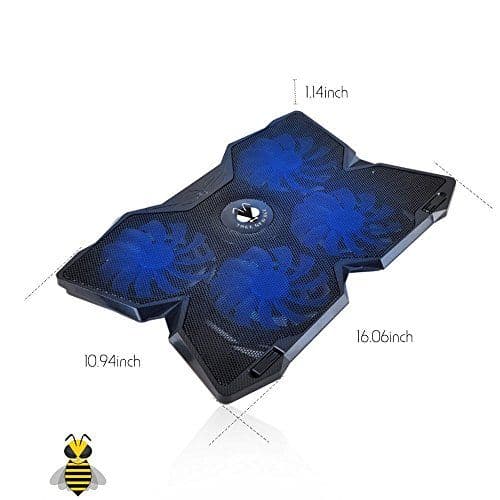
Tree New Bee Cooling Pad
Tree New Bee models are best known as low-cost, multi-fan USB-powered cooling pads that provide decent surface cooling for casual and budget-conscious users. They emphasize affordability and simple ergonomics (often including LED lighting and adjustable angles), making them less powerful than the NotePal X3 but more feature-rich than the cheapest single-fan solutions — an attractive option when minimizing cost is the main requirement.
What Science and Tests Say About Cooling Pads
Research and independent lab testing show that active cooling helps lower laptop component and surface temperatures, which can reduce thermal throttling and improve sustained performance. Cooling pads primarily aid through increased airflow and improved heat exchange between the laptop base and surrounding air. The benefits are most notable for laptops that run warm during long workloads, like gaming, video editing, or extended web browsing sessions with many browser tabs or background processes.
Thermal reduction: Independent tests often report temperature drops of 3 to 10 degrees Celsius at the chassis or intake vents when a cooling pad is used, depending on pad design and laptop model.
Performance and throttling: Lower operating temperatures can delay or reduce CPU and GPU throttling, enabling more consistent performance during sustained tasks.
Component longevity: Electronics tend to have longer lifespans when kept at lower temperatures, as heat accelerates wear on chips and batteries.
Noise and comfort tradeoffs: Better designs balance airflow and acoustic performance; larger, slower-spinning fans often move similar air volumes with lower noise than smaller, faster fans.
Power and compatibility: USB 2.0 supplies roughly 500 mA, USB 3.0 around 900 mA, and USB-C can provide higher currents; choose pads that match your laptop's USB output or include an external adapter for higher-power models.
Ergonomics and posture: Many cooling pads double as angled stands, improving viewing and typing angles which can reduce wrist strain and improve comfort over long sessions.
Frequently Asked Questions
Which cooling pad should I buy for gaming laptops?
Choose Cooler Master NotePal X3: it has a single large 200mm high-airflow fan with adjustable speed plus a steel mesh platform and integrated fan speed controller for strong cooling; it’s rated 4.3 and costs $29.99 USD
Does the Cooler Master NotePal X3 have fan speed control?
Yes—Cooler Master NotePal X3 includes an integrated fan speed controller with a built-in fan speed knob for its single 200mm high-airflow fan; it’s USB-powered, rated 4.3, and priced at $29.99 USD
Is Havit HV-F2056 worth $29.99 compared to others?
At $29.99 USDHavit HV-F2056 gives you a slim tri-fan setup with three 110mm fans, a lightweight aluminum-mesh top, and a dual-USB plug with USB pass-through; it’s rated 4.1 and cheaper than the $29.99 USDNotePal X3.
What warranty duration comes with TopMate C5?
Warranty information isn’t provided for TopMate C5, so I can’t confirm coverage; what’s listed is a five-fan layout with a digital LCD display, foldable stand with multiple height angles, and USB-powered design at $29.77 USDwith a 4.2 rating.
Conclusion
In the USA market for 2026, these five USB-powered cooling pads stand out for mixing performance, portability, and value: Cooler Master NotePal X3, Havit HV-F2056, TopMate C5, Kootek Laptop Cooling Pad, and Tree New Bee Cooling Pad. Each has strengths: the Cooler Master NotePal X3 delivers strong airflow and solid build, Havit HV-F2056 is a lightweight budget favorite, TopMate C5 offers adjustable fan speeds and display features, Kootek balances multi-fan coverage with affordable pricing, and Tree New Bee provides a reliable, quiet option for daily use. For most users seeking the best overall combination of cooling power, build quality, and features, the Cooler Master NotePal X3 is the top pick on this page. I hope you found what you were looking for; you can refine or expand your search using the site search to filter by laptop size, noise level, USB type, or price.